What is a Virtual machine
This article explains what a virtual machine is and why you might want to consider using one
What is a virtual machine?
A Virtual machine (VM) is a virtualised computer (guest) that runs on a physical machine (host)
You can customise this guest machine to match your needs, as long as the host machine has sufficient resources and the chosen virtualisation technology supports the configuration.
Why use a virtual machine, what can you do with it ?
There is a wide range of reasons why you might want to use a virtual machine and it is not possible for me to list out all the reasons why you might want to use one, but here is a few examples:
A virtual machine can be set up as an isolated environment allowing you for safer testing of unknown files, or even just tinkering and learning about your machine without having to be afraid of breaking your actual pc, infecting it with virus or similar. (Note that while virtual machines provide isolation they do not necessarily guarantee complete protection against ma#lware or other threats and may need to go through hardening if you intend to use it for this purpose, but that is another topic for another article)
What if you want to play a game that is not supported by modern computers? A VM can help here too by allowing you to run older operating system that supports the game.
You can also use VM's to just test new operating systems before actually installing them on your pc.
You can use virtual machines to build specific workspaces for specific things.
You could even bring an old, unused laptop back to life by running a virtual machine on it dedicated to hosting a media server.
How does a Virtual Machine work ?
A virtual machine works by using software to create a virtual version of a computer's hardware.
What this means is that virtualisation software allows the physical computer (host) to allocate some of its resources, such as CPU, RAM and storage, to a virtual computer (guest). The guest then behaves like a separate computer, allowing it to run its own operating system and programs independently of the host.
You can decide what operating system you would like to run on your virtual machine independently without having to uninstall the operating system on your physical machine. You can assign how much storage space that machine is allowed to use, how many cores from CPU it can borrow from the host machine, how much RAM it should have access to and so forth.
But why, what's the point?
Imagine a family household of 4 people.
Person 1 already has a powerful computer that he does not use all the time. Person 2 - 4 has no computer.
Person 2, 3 and 4 needs a computer but for different reasons.
Person 2: Wants to scrolls on the web Person 3: wants to play games Person 4: Wants to do video editing or 3d modelling
Since person 1 already owns a powerful PC, he might not need to buy a separate expensive machine for each member of the household that has the specs that a gamer and a 3d modeller need to do what they want to do.
Instead we can spin up 3 virtual machines on this powerful computer, then buy a cheap used laptop for each of the other members of the family, and each family member can use each their own laptop to connect in to the households "server" machine and lend a piece of the power allowing each member to do their task.
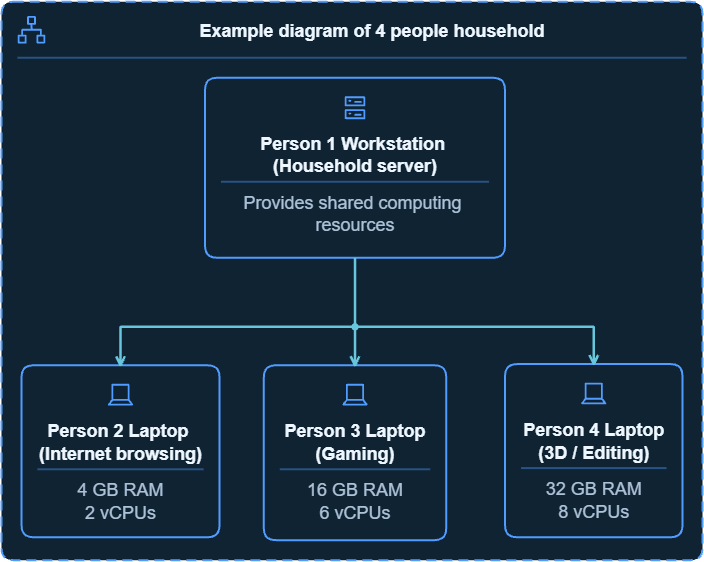
Person 1, owner of the server can provision the servers resources to match each household members needs, Example:
Person 2: only scrolls on the web so we can give them 2 cores and 4 gig ram. Person 3: does gaming, so we can give them 16 gig ram and 6 cores and a portion of the graphics card. person 4: does heavy video editing or modelling. We can give them 32 gig ram and 8 cores and another portion of the graphics card.
And as long as the machine's hardware and software support it, they can all use their portion of the machine, get their own desktop environment and install whatever software they need without the main host needing to have the same programs making each isolated instance custom to their needs. Some business' uses similar setup.
You have a central server, and many clients connecting in to this server to use their portion of allocated resources on their customised desktops.
Glossary
VM Virtual machine
A machine that is created digitally / virtually as opposed to a physical machine, its resources are provided by the host machine (the physical machine)
Virtualisation
A technology that creates a software based simulated version of a physical computer or resource
CPU Central Processing unit
The computers brain - think of this as the brain power
RAM - Random access memory
Working memory - think of this as how much short term memory the computer has available
OS - Operating System
The Software your PC runs on like windows, ubuntu, macOS. Think of this as the computer's "personality", Every human has their own personality with skillsets and behaviours. Computers does too.
Resource(s)
Refers to components such as but not limited to: CPU, RAM, GPU, Storage.
Guest (Guest OS)
A guest is a virtual machine running on a physical computer (host). The operating system installed inside the virtual machine is called the guest operating system (Guest OS).
Host
In virtualisation a host is the physical computer or server that provides the hardware resources that the guest relies on to run - not to be confused with networking term "host" where the word takes on a different meaning.
Client
A client is a computer, device or software application that connects to a server to access its services or resources. For example, a laptop connecting to a virtual desktop running on a server.